
Free TradingView indicators
built for NQ futures traders
QuantCyphr Levels (QC-L) plots Greg AI's daily key levels straight onto your chart, and QuantCyphr State (QC-S) reads the NQ regime and marks the exact bar it flips. Both are free to add on TradingView, built for NQ futures.
QuantCyphr Levels
v1.0 · TradingView
Plot Greg AI's daily key levels on your chart in seconds.
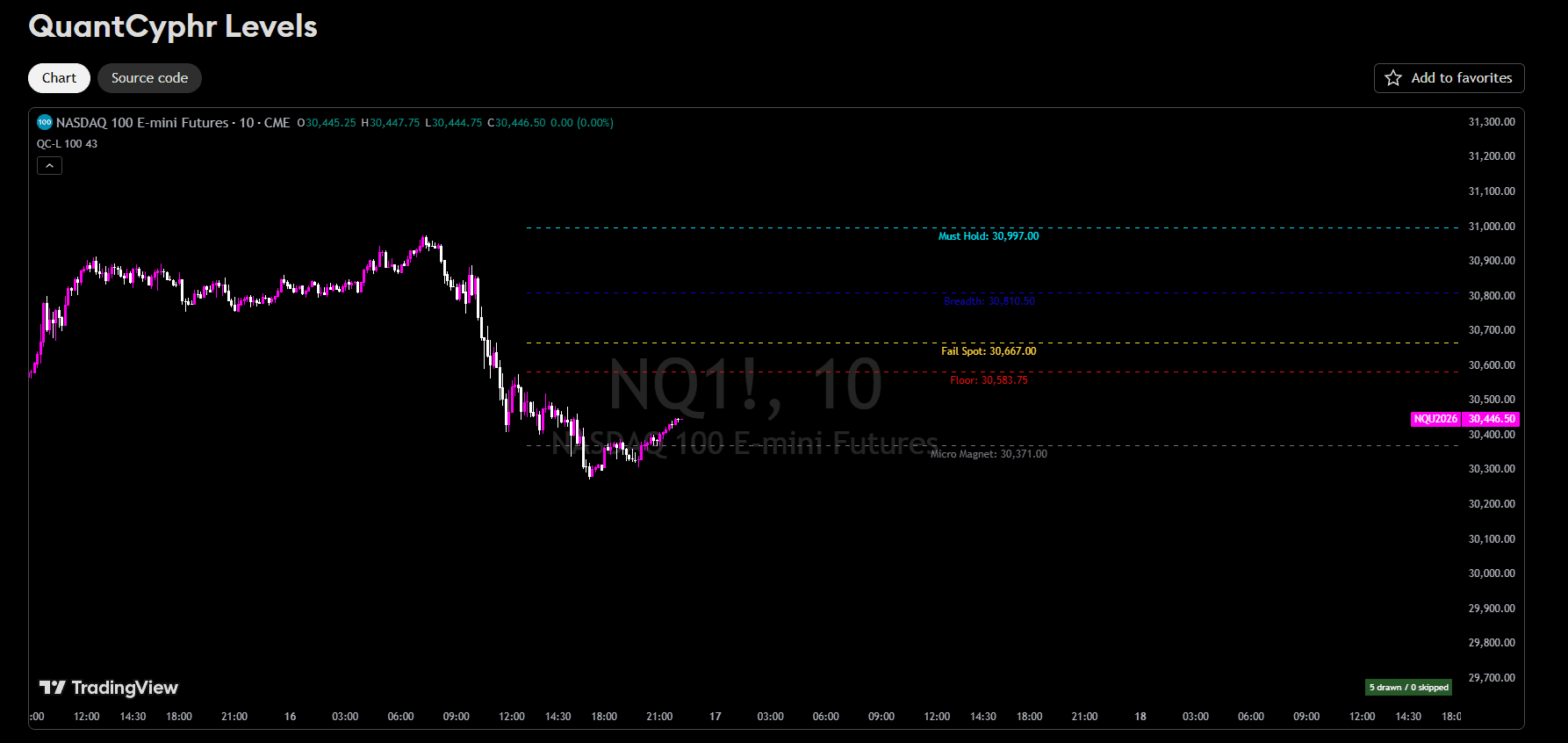
Each morning, Greg AI publishes up to 11 key price levels for the NQ futures session ~ structure, magnets, triggers. This free TradingView indicator takes those levels directly from your QuantCyphr dashboard via a single copy-paste. No manual drawing. No guessing. Just clean, labeled levels on your chart the moment markets open.
11 Level Types
How to use QuantCyphr Levels on TradingView
- 01
Add the free script
Open QuantCyphr Levels on TradingView and add it to your indicators. It is free ~ no QuantCyphr account needed just to add it to your chart.
- 02
Drop it on your NQ chart
Apply QC-L to any Nasdaq (NQ) futures chart. The indicator renders Greg AI's level set as clean, labeled horizontal lines.
- 03
Copy today's levels from QuantCyphr
QuantCyphr members open the GG dashboard or morning report and click ◈ COPY LEVELS. All of that session's active levels copy in the exact format QC-L expects.
- 04
Paste and go
Open the indicator settings → Levels Data field → paste. Every level renders instantly. New levels each session, no manual drawing.
QuantCyphr State
v1.0 · TradingView
Read the market's regime and catch the exact bar it flips.
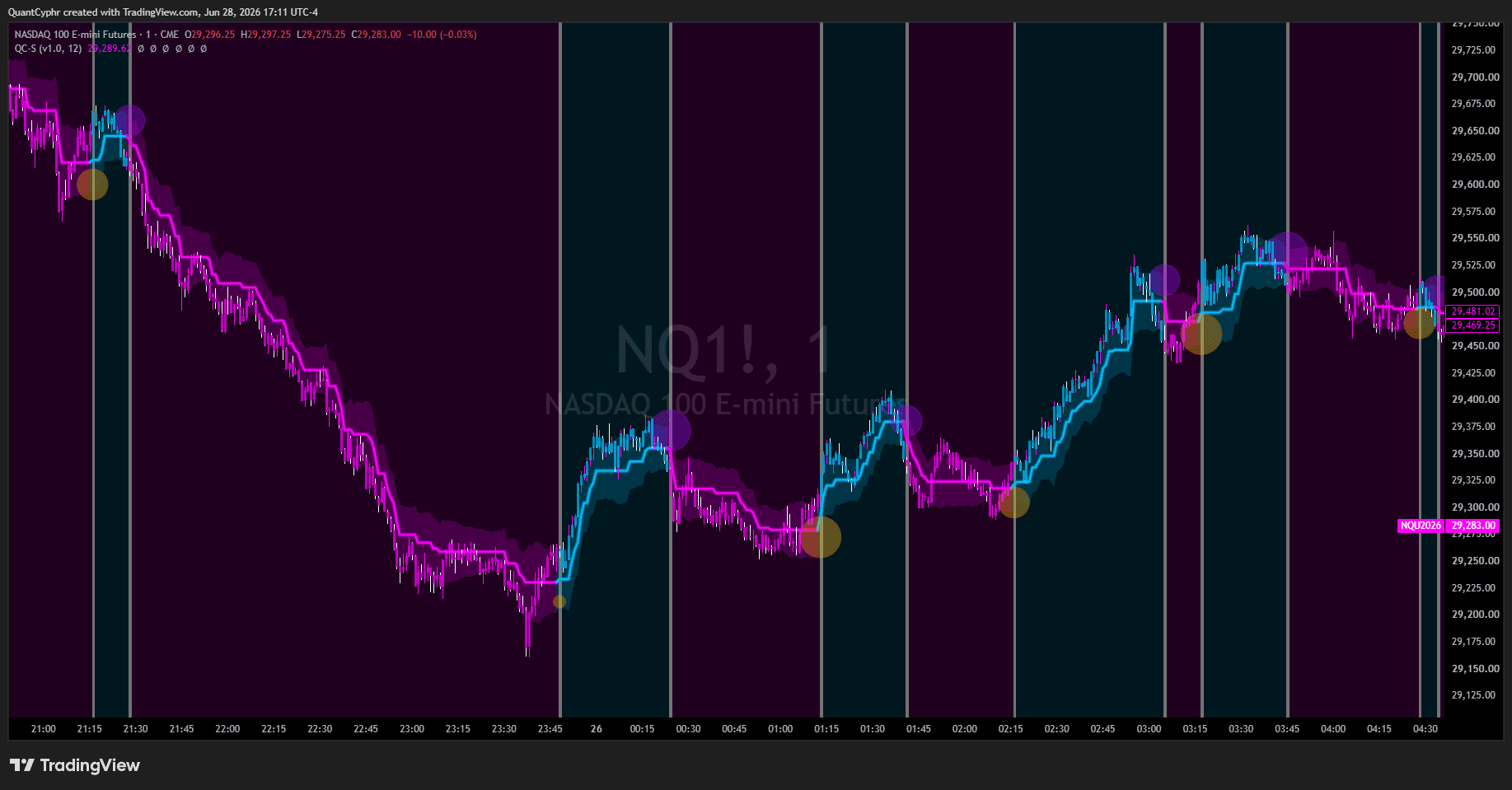
QuantCyphr State (QC-S) reads whether NQ futures are trading in a bull or bear regime and marks the precise bar the trend flips ~ a Prime signal on a turn up, a Fade signal on a turn down, each sized by how decisive the move is. A volatility trend cloud frames the move and the most recent flip prices stay pinned to your chart as ready-made reference levels. Free on TradingView and fully self-contained ~ no data feed, no copy-paste, nothing to maintain.
What it does
Regime detection
A glowing state line shows at a glance whether NQ futures are trending bull or bear right now.
Prime & Fade signals
A Prime marker fires the bar the trend flips up; a Fade marker the bar it flips down. Marker size scales with how decisive the flip is.
Trend cloud
A volatility ribbon wraps the state line ~ widening as the market moves, tightening as it coils ~ a dynamic support and resistance zone.
Flip levels on your chart
The price of each recent regime flip stays pinned to your chart with a numeric tag, giving you ready-made reference levels.
Repaint control
A Confirm on Bar Close switch lets you choose live early-warning signals or locked signals that commit only once the bar closes.
Built-in alerts
Separate Prime, Fade, and any-flip alerts ~ each one toggleable ~ so you are pinged only on the moves you care about.
How to use QuantCyphr State on TradingView
- 01
Add it to your NQ chart
Open QuantCyphr State on TradingView and add it to any NQ (Nasdaq 100) futures chart. It works on standard candlestick charts ~ no setup and no data to paste.
- 02
Pick your signal mode
Leave signals live to watch a flip develop in real time, or switch on Confirm on Bar Close for locked signals. The choice sits right at the top of the panel.
- 03
Read the regime
Follow the state line and trend cloud for the active regime, and watch for Prime and Fade markers on the exact bar the trend flips. Recent flip levels stay on your chart as reference zones.
- 04
Set your alerts
Turn on Prime, Fade, or any-flip alerts so QuantCyphr State pings you the moment a regime change fires ~ even when you are away from the chart.
Get daily NQ futures levels from Greg AI
The indicator is free. The edge is the data.
QC-L draws whatever levels you give it. QuantCyphr is where those levels come from ~ Greg AI publishes a fresh, all-day read on NQ futures every session: structure, magnets, triggers, and the thesis behind them. Plug it into QC-L and your chart is mapped before the open.
Start freeFrequently asked questions
What is QuantCyphr Levels (QC-L)?
QuantCyphr Levels (QC-L) is a free TradingView indicator that plots Greg AI's daily key price levels for NQ (Nasdaq 100) futures ~ structure, magnets, and triggers ~ as clean, labeled lines on your chart. You paste each session's levels from your QuantCyphr dashboard and the indicator draws them instantly, with no manual charting.
Is the QuantCyphr Levels indicator free?
Yes. QuantCyphr Levels is free to add on TradingView and no QuantCyphr account is required to install the script. The live daily levels that the indicator plots are published by Greg AI and are included with a QuantCyphr subscription.
How do I get Greg AI's daily levels into the indicator?
QuantCyphr members open the GG dashboard or the morning report and click Copy Levels. Paste the copied text into the indicator's Levels Data field in TradingView and every level renders instantly. Greg AI publishes a fresh set of levels each trading session.
What market does QuantCyphr Levels support?
QuantCyphr Levels is built for NQ (Nasdaq 100) futures, the market Greg AI covers. You can add the indicator to any NQ futures chart on TradingView.
Do I need a TradingView account to use QuantCyphr Levels?
A free TradingView account is enough to add QuantCyphr Levels to your charts. You only need a QuantCyphr subscription to receive Greg AI's live daily levels that the indicator plots each session.
What is QuantCyphr State (QC-S)?
QuantCyphr State (QC-S) is a free TradingView indicator for NQ (Nasdaq 100) futures that reads whether the market is in a bull or bear regime and marks the exact bar the trend flips. It shows a Prime signal when the trend turns up and a Fade signal when it turns down, frames the move with a volatility trend cloud, and keeps the most recent flip prices on your chart as reference levels.
Is QuantCyphr State free, and does it need a QuantCyphr account?
Yes, QuantCyphr State is free to add on TradingView and no QuantCyphr account is required. Unlike QuantCyphr Levels, it is fully self-contained ~ it generates its own signals on your chart with no data feed to paste and nothing to maintain.
Does QuantCyphr State repaint?
Closed bars never change ~ once a bar finishes, its signals are final. The currently forming bar updates in real time, like any live indicator, so a signal can appear and withdraw before the bar closes. QuantCyphr State includes a Confirm on Bar Close switch that commits signals only once the bar closes, for non-repainting markers and alerts.
What are Prime and Fade signals?
Prime and Fade are QuantCyphr State's regime-flip signals. A Prime marker fires on the bar the market flips from bear to bull; a Fade marker fires on the bar it flips from bull to bear. The size of each marker reflects how decisive that flip is.
What market and chart type does QuantCyphr State support?
QuantCyphr State is built for NQ (Nasdaq 100) futures, the market Greg AI covers, and is designed for standard candlestick charts on TradingView. Non-standard chart types such as Heikin Ashi, Renko, and Range use synthetic prices, so the indicator shows an on-chart notice when one is detected.
Can I get alerts from QuantCyphr State?
Yes. QuantCyphr State includes separate Prime, Fade, and any-flip alerts, and each one can be toggled on or off so you are notified only on the regime changes you want. The alerts follow the same Confirm on Bar Close setting as the on-chart signals.
More TradingView indicators coming soon
More QuantCyphr TradingView indicators are in development. Follow along on the platform ~ new tools ship to members first.
QC-L is one piece of the QuantCyphr platform ~ a voice AI trading journal, Greg AI market intelligence for NQ futures, and more.